The Payline Batch Processor is designed to process input files containing credit card payment information for authorisation.
Input file
A CSV (Comma Separated Value) file upload from a directory to the Payline website and processed - e.g. INPUT.CSV Payment Express Batch Processor
Output file
Another CSV file is created containing the original transaction and the result for that transaction. This is made available for download from the Payline website in the reports section.
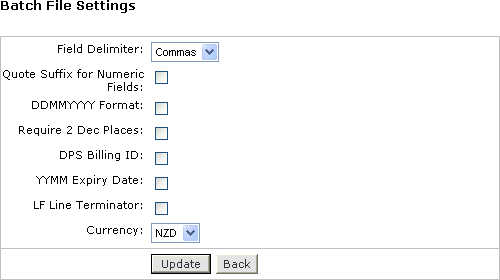
| Quote Suffix For Numeric Fields | If checked appends a single quote (') to numeric fields like Card Number. This prevents Microsoft Excel etc from interpreting such fields as a number value causing corruption of the value if the file is later saved by Excel. |
| Field Delimiter | This is the format you have created your csv file. Fields either separated by commas or delimited by quotes. The quotes are helpful when you are using a comma delimiter and have a comma in a text field which you do not want to delimit (break apart into multiple fields). |
| DDMMYYYY Format | If checked PXBAT will output AcquirerDate and DateSettlement dates in DDMMYYYY format where DD is Day or month MM is month 01-12 and YYYY is year. Default: Not checked (dates output in YYYYMMDD format). |
| YYMM Expiry | If checked PXBAT will interpret expiry dates in YYMM format not MMYY. Default: Not checked (date format for expiry dates is MMYY) |
| Require 2 decimal places | Reserved. Default: Not Checked |
| DPS BillingId | If checked a DpsBillingId can be used for recurring billing purposes. If unchecked you can use your own BillingId for token billing transactions. Default: Not checked. |
| EnableRetry | If checked automatically retries transactions failed due to a transient condition such as communications failure. Default: Checked (Retry transactions failed due to transient faults). |
| Currency | Determines the currency of the transaction for the input file - eg NZD USD etc. |
| LF Line Terminator | If your CSV uses LF (Line Feed) terminators instead of plain CRs (carriage returns) then you should check this box. |
Input File format is CSV (Comma Separated Value), Excel style. Each line of the file represents an authorisation, purchase, completion or refund request and has the following format:
TxnType,Account,MerchantReference,CardNumber,Expiry,Amount,DpsTxnRef,CPC,
CardHolderName
| Field | Parameter | Description |
|---|---|---|
| 1 | TxnType | Transaction type that you would like to send. Can be Purchase Refund Tipping or Billing type transactions. Valid values are 'A'=Auth 'C'=Completion 'P'=Purchase 'R'=Refund 'V'=Validate 'B'=Bill |
| 2 | Account | Payment Express account number. Values can be 0-9999 depending upon account to settle to. |
| 3 | MerchantReference | Free transaction reference field. E.g.: booking reference order reference or invoice number. |
| 4 | CardNumber/BillingId/ | Card Number. Note - must be followed by a single ' character if this file is loaded and saved using Microsoft Excel spreadsheet. DpsBillingId |
| 5 | ExpiryDate | Card Expiry Date in MMYY format. Some acquirers do not require this field - contact Payment Express for more details. Also not required if BillingId/DpsBillingId is used. |
| 6 | Amount | Amount in d.cc format e.g. $1.23 would be 1.23 |
| 7 | PreAuthNumber/DpsTxnRef | Either PreAuthNumber or DpsTxnRef (Preferred) needs to present for completion requests to match against original authorisation. DpsTxnRef will also need to be present for Refund transactions to match the original Purchase Completion or Billing transaction. |
| 8 | CPC | Corporate Purchase Card transactions. Extended data which will appear on corporate cardholders statements if your merchant account supports it. |
| 9 | CardHolderName | Cardholder Name if known. |
Sample Input Record Format
P,9997,Ref1,4111111111111111,1010,1.23,,,TEST NAME1
The above input line describes a Purchase transaction for account 9997, Merchant Reference "Ref1",card number 4111111111111111, Expiry Date October 2010, amount $1.23, PreAuthNumber blank,reserved value blank, Card holder name is "TEST NAME1". Additional data (if present is ignored and is not written to output file. Trailing single quotes (') or double quotes (") are ignored. These should be included to prevent the cardnumber etc being interpreted as decimal values by Excel. IE: cardnumber should be input as 4111111111111111' not 4111111111111111).
Input File format is CSV (Comma Separated Value), Excel style. The file type .CSV is preserved. Each line of the file represents an authorisation, purchase, completion or refund result and has the following format:
TxnType,Account,MerchantReference,CardNumber,ExpiryDate,Amount,DpsTxnRef(Input),
CPC,CardHolderName,Result,ResponseCode,ResponseText,DpsTxnRef(Output),
AcquirerDate,AcquirerTime,AuthCode
| Field | Parameter | Description |
|---|---|---|
| 1 | TxnType | Transaction type that you would like to send. Can be Purchase Refund Tipping or Billing type transactions. Valid values are 'A'=Auth 'C'=Completion 'P'=Purchase 'R'=Refund 'V'=Validate 'B'=Bill |
| 2 | Account | Payment Express account number. Values can be 0-9999 depending upon account to settle to. |
| 3 | MerchantReference | Free transaction reference field. E.g.: booking reference order reference or invoice number. |
| 4 | CardNumber/BillingId/ | Card Number. Note - must be followed by a single ' character if this file is loaded and saved using Microsoft Excel spreadsheet DpsBillingId |
| 5 | ExpiryDate | Card Expiry Date in MMYY format |
| 6 | Amount | Amount in d.cc format e.g. $1.23 would be 1.23 |
| 7 | PreAuthNumber/ | Either PreAuthNumber or DpsTxnRef (Preferred) needs to present for completion requests to match against original authorisation. DpsTxnRef will also need to be present for Refund transactions to match the original Purchase Completion or Billing transaction. DpsTxnRef |
| 8 | CPC | Corporate Purchase Card transactions. Extended data which will appear on corporate cardholders statements if your merchant account supports it. |
| 9 | CardHolderName | Cardholder Name if known. |
| 10 | Result | Success of the transaction. 0=declined/failed 1=accepted |
| 11 | ResponseCode | 2 character response code e.g.: "00" |
| 12 | ResponseText | Text associated with response code. E.g.: "ACCEPTED" |
| 13 | AuthCode | Authorisation (Approval) code if accepted. |
| 14 | DpsTxnRef | Payment Express unique transaction reference of the new transaction |
| 15 | AcquirerDate | YYYYMMDD |
| 16 | AcquirerTime | HHMMSS |
| 17 | DateSettlement | YYYYMMDD |
Sample Output Record Format
P,0,Ref1,"4988720008880035",0102,133.20,,345,A J CARDHOULD,1,00,ACCEPTED,886453,
100035REF1,19990912,180922,19990912
The above output line describes a Purchase transaction for account 0, reference "Ref1", card number 4988720007770035, Expiry Date January 2002, amount $133.20, CVC2 value 345, Card holder name is "A J CARDHOULD", Result is 1 (approved), ResponseCode is "00", Text is ACCEPTED, TxnRef is 100035REF1, Date is 12th Sep 1999, Time is 6:09:22pm, Approval Code is 886453 and Date of Settlement is 12 Sept 1999
Input Sample
P,9997,Reference,4111111111111111,0106,1.23,,,TEST NAME
Output Sample
P,9997,Reference,4111111111111111,0106,1.23,,,TEST NAME,1,00,APPROVED,031507,0000000300a7a5e9,20050311,031507,20050311
Note: The DpsTxnRef (0000000300a7a5e9) that can be used later for refund transactions is highlighted in the output.
(Version 3.32 & above only)
Input Sample
R,9997,Reference,,,1.23,0000000300a7a5e9,,TEST NAME
Output Sample
R,9997,Reference,,,1.23,0000000300a7a5e9,,TEST NAME,1,00,APPROVED,032042,0000000300a7a5ea,20050311,032042,20050311
Note: The DpsTxnRef is highlighted above. This value is given as the output in the original purchase, complete or billing transaction. All refund transactions need to be matched with the original transaction.
Input Sample
A,9997,Reference,4111111111111111,0106,1.23,,,TEST NAME
Output Sample
A,9997,Reference,4111111111111111,0106,1.23,,,TEST NAME1,1,00,APPROVED,00113400a7a5c400000003,0000000300a7a5e9,20050307,001134,
20050307
Note: The Pre-Authorisation code (00113400a7a5c400000003) is given back and can be used to complete transactions.
Note: The DpsTxnRef (0000000300a7a5e9) is given back and is the preferred method for matching the completions.
Input Sample
C,9997,Reference,,,1.23,03471400a7a5eb00000003,,TEST NAME
Output Sample
C,9997,Reference,4111111111111111,0106,1.23,03471400a7a5eb00000003,,TEST NAME,1,00,APPROVED,035204,0000000300a7a5ed,20050311,035204,20050311
Note: The Pre-Auth Number is highlighted above. This value was given as the output from the original authorisation transaction.
(Version 3.32 & above only)
Input Sample
C,9997,Reference,,,1.23,0000000300a7a5e9,,TEST NAME
Output Sample
C,9997,Reference,4111111111111111,0106,1.23,0000000300a7a5e9,,TEST NAME,1,00,APPROVED,001314,0000000300a7a5c5,20050307,001314,20050307
Note: The DpsTxnRef is highlighted above. This value was given as the output from the original authorisation transaction. A further DpsTxnRef is given back in the completion response and is unique to the complete transaction and would be used to match a refund against the transaction.
Input Sample
B,9997,Reference,00000000022367439876215729745683,,1.23,,,TEST NAME
Output Sample
B,9997,Reference,00000000022367439876215729745683,,1.23,0000000300a7a5e9,,TEST NAME,1,00,APPROVED,001314,0000000300a7a5c5,20050307,001314,20050307
Note: On the Setup tab of the PXBAT control panel the check box named "DPS BillingId" needs to be unchecked.
Note: The BillingId used here was 00000000022367439876215729745683
(Version 3.32 & above only)
Input Sample
B,9997,Reference,0000000000518077,,1.23,,,TEST NAME
Output Sample
B,9997,Reference,0000000000518077,,1.23,,,TEST NAME,1,00,APPROVED,104753,00000004010486cd,20050614,104753,20050614
Note: On the Setup tab of the PXBAT control panel the check box named "DPS BillingId" needs to be checked.
Note: The DpsBillingId used here was 0000000000518077
AcquirerDate (output) Max 8 bytes
Contains the date the transaction was processed in YYYYMMDD format. This field may be blank if the transaction was rejected locally or otherwise not processed by the bank host.
AcquirerTime (output) Max 8 bytes
Contains the date the time of the day the transaction was processed in HHMMSS format. This field may be blank if the transaction was rejected locally or otherwise not processed by the bank host.
Amount (input) Max 13 characters
Set the amount to be charged or refunded (depending on the TxnType). Format is d.cc (d=dollars, c=cents). Max amount is 99999.99
BillingId (input) Max 32 characters
This is an identifier generated by the merchant application that is used to identify a customer or billing entry and can be used as input instead of card number and date expiry for subsequent billing transactions.
CardHolderName (output) Max 64 characters
The cardholder name as it appears on customer card.
CardNumber (input) Max 20 characters
The card number. No leading or embedded blanks are permitted. Must contain a numeric value.
Corporate Purchase Card (input) Mandatory 30 characters
Amex Corporate Purchase Card transactions. Extended data, which will appear on corporate cardholders statements if your merchant account supports it. This field needs to be exactly 30 characters, with the first character being an "A". The CPC field contains 2 corparate purchase card reference fields, with the 1st 9 characters after the "A" belonging to Corporate Purchase Card data 1 and the last 20 characters of the CPC input field belonging to Corporate Purchase Card data 2. You will need to pad if your reference is shorter than the required field length.
Example - P,9997,Reference,4111111111111111,0106,1.23,,A4387436 Payment March ,TEST NAME
DateExpiry (input) Max 4 bytes
Indicates card expiry date. Format is MMYY where MM is month 01-12 and Year 00-99. do not insert "/" or other delimiter. Some acquirers do not require this field - contact Payment Express for more details. Also not required if BillingId/DpsBillingId is used.
DateSettlement (output) Max 8 bytes
Indicates Date of settlement (when money will be deposited in Merchant bank account) if this is supported by the Acquirer, otherwise contains the date the transaction was processed in YYYYMMDD format.
DpsTxnRef (input/output) Max 16 Characters
For future use. Returned for every transaction. If the transaction was approved, DpsTxnRef can be used as input to a Refund or Completion transaction for other Payment Express products. Used to specify a transaction for refund without supplying the original card number and expiry date. The DpsTxnRef value returned by the original approved Auth transaction must be supplied also when doing a complete transaction.
DpsBillingId (input) Max 16 Characters
When output, contains the Payment Express generated BillingId. Only returned for transactions that are requested by the application with the EnableAddBillCard value set to 1 (true) indicating a token billing entry should be created.
MerchantReference (input) Max 32 Characters
Free text to appear on transaction reports.
ResponseText (output) Max 20 Characters
The Response Text is associated with ResponseCode. For successful transactions this is usually Approved and for unsuccessful transactions this can be a number of texts depending on why the transaction declined. For example it could be Card Expired, Declined, Invalid Card, REFER TO CARD ISSUER, DO NOT HONOUR. All acquirers have their own response texts and should be displayed for better understanding of why the transaction got declined.
ResponseCode (output) Max 2 characters
2 character response code from the bank. Explanation of the ResponseCode is usually provided in the ResponseText.
Result (output) Boolean true/false
Indicates success or failure of the transaction. 1 for successful and 0 for an unsuccessful transaction.
TxnType (input) Max 1 Character
| Value | Description |
|---|---|
| P | Purchase |
| R | Refund |
| A | Auth |
| C | Completion |
| V | Validate |
| B | Bill |
| H | Reserved. (Add Bill Card) |
| J | Reserved. (Validate & Add Bill Card ) |

